24/7/365 Support
Get fast, human help whenever you need it. Our support team is here to keep your server running smoothly.

We provide variety of features from basic to advance at fraction of cost.
Get fast, human help whenever you need it. Our support team is here to keep your server running smoothly.
Deploy closer to your players with global locations designed to cut lag and improve connection quality.
Get your Terraria server configured faster with guided setup tools and ready-to-tune settings instead of slow manual setup.
Every server is protected against common attacks, helping reduce downtime and keep communities online.
Share your server more easily with free, customizable subdomains that look cleaner than raw IP addresses.
Change your server to another supported game whenever you want without paying extra for the switch.
Powerful control panel with file manager, mod support, backups, and instant setup.
Upload your files seamlessly .
Change the gameconfigs with no hassle.
Modpacks, jars, installers, or version controls in one page.
Give users confidence with restore points, backup lists, and recovery tools.
Present fast deployment, startup settings, and beginner-friendly onboarding.
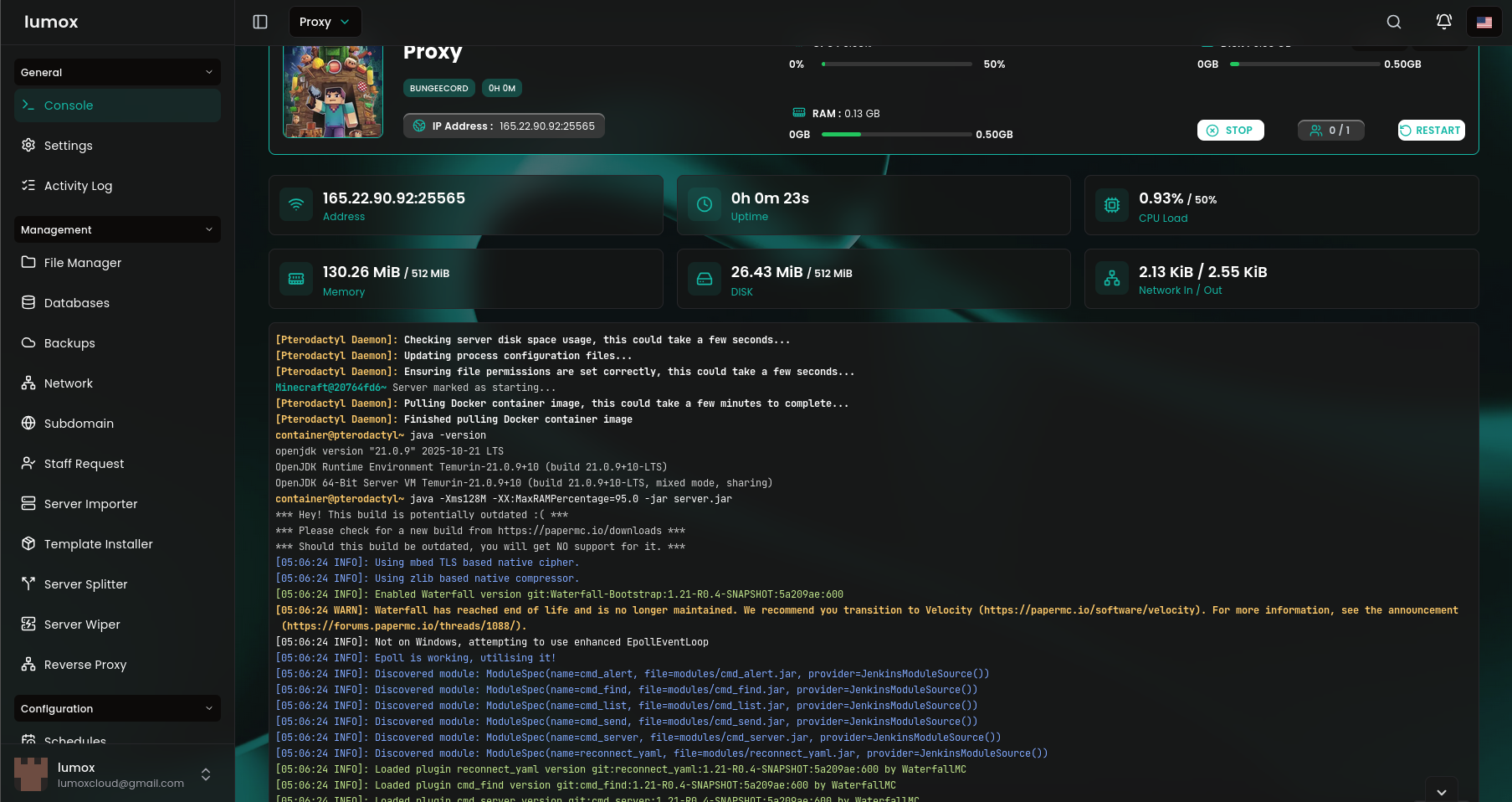
Everything here is built for Terraria hosting, so you get fast setup, stable performance, and real help when your world starts growing.
Your server is provisioned quickly, so you can move from checkout to panel access and gameplay without waiting around.
Strong hardware and tuned hosting keep your Terraria server feeling responsive during exploration, combat, and busy sessions.
If something feels off, you can reach out fast and get help with setup, tuning, and day-to-day server management.
ZX Line is built for raw Ryzen performance. NX Line is tuned for dependable value. Pick your line, then match RAM to your player count, world size, mods, and growth.
Choose a category and open the answer you need. Everything is grouped so players can find billing, account, and setup help faster.
Billing starts once your order is created and the server is provisioned for you. From there, renewals follow the plan cycle shown during checkout.
Yes. Starting smaller is common, then moving up as your player count, world size, or mod usage grows. If you need a change in the other direction, support can guide you through the safest option.
If you purchased the wrong setup or ran into a provisioning issue, contact support as soon as possible so the order can be reviewed under the current refund policy.
Once your order is active, the server appears in your Lumox dashboard and you can open the panel from there. That is where you will handle files, startup settings, backups, power controls, and day-to-day management.
You can organize access through your Lumox account and panel tools. If you want shared management for moderators, builders, or co-owners, support can help you choose the safest setup without giving away your main login.
Use the account recovery flow first. If you still cannot get back in, contact support and we can help verify ownership and get you pointed in the right direction.
Yes. Renaming the server inside your dashboard or panel is a simple way to keep multiple servers organized, especially if you are running test, event, or staff worlds alongside a main one.
Most everyday changes happen directly in the panel, including files, startup flags, versions, backups, schedules, and restarts. For bigger account or infrastructure changes, the support team can help.
NX Line is the better fit if you want reliable uptime and value-focused pricing. ZX Line is built for stronger raw performance, which makes it a better choice for larger Terraria worlds, busier sessions, and heavier mod use.
4 GB is a solid start for smaller private worlds. 6 GB is the safest all-round choice for growing communities. 8 GB or more is better for larger maps, heavier mods, and longer sessions.
Yes. You can run standard Terraria worlds, tModLoader-based setups, and custom configurations if you already know the experience you want to build.
If you need a different location for latency or player distribution, contact support before or after ordering and we can help you choose the best option available for your server.
Yes. The platform includes backup tools through the panel and protection against common DDoS attacks, so you have both recovery options and a stronger baseline for uptime.
You can reach out through live chat, tickets, or Discord whenever you need setup help, troubleshooting, or guidance on what to choose next.

Build your world your way. Choose how you play, explore new mechanics, and create unforgettable experiences with powerful server performance.
Review your selected plan before continuing to checkout.
Your selected plan will open on its own checkout link once you continue.